国庆节10月1日
--

SpringBoot 三层架构实现部门列表查询,含驼峰命名映射与Nginx反向代理联调
部门查询功能用于查询所有部门数据并展示在部门管理页面中。基于 SpringBoot 三层架构(Controller → Service → Mapper)实现,涉及 MyBatis 字段映射、驼峰命名规则、请求方式限定以及前后端联调。
三层架构每一层的职责:
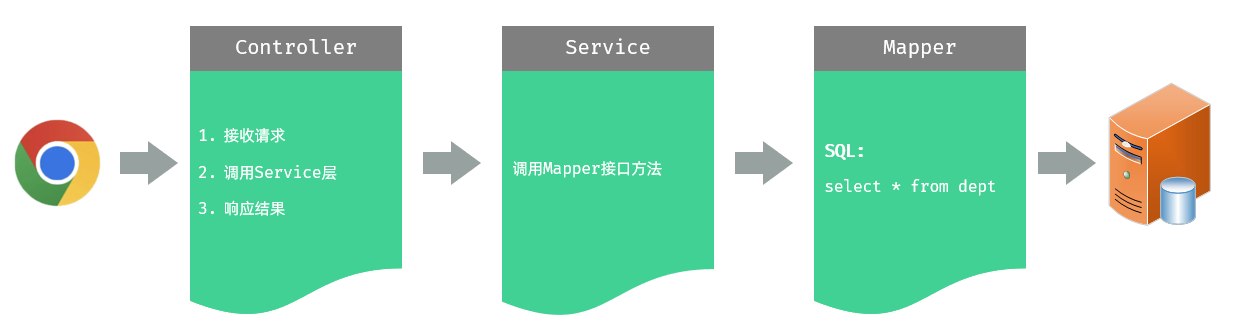
@RestControllerpublic class DeptController {
@Autowired private DeptService deptService;
@GetMapping("/depts") public Result list() { List<Dept> deptList = deptService.findAll(); return Result.success(deptList); }}限定请求方式有两种方法:
@RequestMapping(value = "/depts", method = RequestMethod.GET) — 通过 method 属性限定@GetMapping("/depts") — 使用衍生注解(推荐)| 请求方式 | 衍生注解 |
|---|---|
| GET | @GetMapping |
| POST | @PostMapping |
| PUT | @PutMapping |
| DELETE | @DeleteMapping |
// DeptService 接口public interface DeptService { public List<Dept> findAll();}
// DeptServiceImpl 实现@Servicepublic class DeptServiceImpl implements DeptService { @Autowired private DeptMapper deptMapper;
public List<Dept> findAll() { return deptMapper.findAll(); }}@Mapperpublic interface DeptMapper { @Select("select * from dept") public List<Dept> findAll();}当实体类属性名和数据库表字段名不一致时,MyBatis 不能自动封装。
例如数据库字段 create_time、update_time,实体类属性 createTime、updateTime。
三种解决方案:
@Results({ @Result(column = "create_time", property = "createTime"), @Result(column = "update_time", property = "updateTime")})@Select("select id, name, create_time, update_time from dept")public List<Dept> findAll();@Select("select id, name, create_time createTime, update_time updateTime from dept")public List<Dept> findAll();如果字段名与属性名符合驼峰命名规则(abc_xyz → abcXyz),MyBatis 可自动映射。
mybatis: configuration: map-underscore-to-camel-case: true前提:实体类属性与数据库字段名严格遵守驼峰命名规则。
前端工程通过 Nginx 反向代理访问后端 Tomcat 服务器。
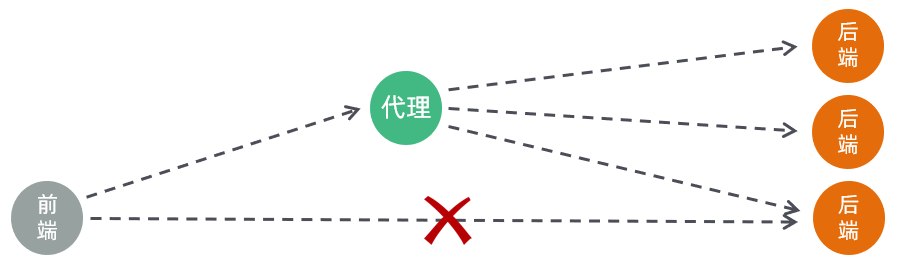
请求访问流程:
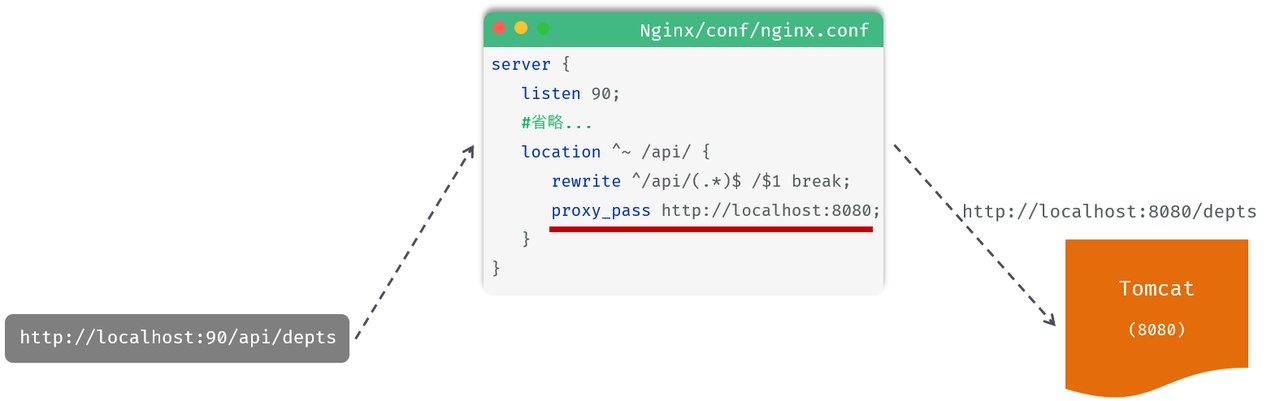
Nginx 配置关键指令:
location:定义匹配特定 URI 请求的规则^~ /api/:精确匹配以 /api/ 开头的路径rewrite:重写匹配到的 URI 路径proxy_pass:代理转发,将匹配到的请求转发给后端服务器使用 Nginx 反向代理的原因:
@GetMapping 等衍生注解限定请求方式,简洁优雅@Results 手动映射仅在字段名无法自动映射时使用如果你喜欢,那么欢迎来到我的世界!
了解更多暂未播放