



Python with 关键字
Python with 关键字


Python with 关键字的使用方法和上下文管理器
在 Python 编程中,资源管理是一个重要但容易被忽视的环节。 with 关键字为我们提供了一种优雅的方式来处理文件操作、数据库连接等需要明确释放资源的场景。
with 是 Python 中的一个关键字,用于上下文管理协议(Context Management Protocol)。它简化了资源管理代码,特别是那些需要明确释放或清理的资源(如文件、网络连接、数据库连接等)。
为什么需要 with 语句?
传统资源管理的问题
我们先看一个典型的文件操作示例:
实例
file = open('example.txt', 'r')try: content = file.read() # 处理文件内容finally: file.close()这种写法存在几个问题:
- 容易忘记关闭资源 :如果没有
try-finally块,可能会忘记调用close() - 代码冗长 :简单的文件操作需要多行代码
- 异常处理复杂 :需要手动处理可能出现的异常
with 语句的优势
with 语句通过上下文管理协议(Context Management Protocol)解决了这些问题:
- 自动资源释放 :确保资源在使用后被正确关闭
- 代码简洁 :减少样板代码
- 异常安全 :即使在代码块中发生异常,资源也会被正确释放
- 可读性强 :明确标识资源的作用域
with 语句的基本语法
基础用法
with 语句的基本形式如下:
语法格式
with expression [as variable]: # 代码块expression返回一个支持上下文管理协议的对象as variable是可选的,用于将表达式结果赋值给变量- 代码块执行完毕后,自动调用清理方法
文件操作示例
最常见的 with 语句应用是文件操作:
实例
with open('example.txt', 'r') as file: content = file.read() print(content)# 文件已自动关闭这段代码等价于前面的 try-finally 实现,但更加简洁明了。
with 语句的工作原理
上下文管理协议
with 语句背后是 Python 的上下文管理协议,该协议要求对象实现两个方法:
__enter__():进入上下文时调用,返回值赋给as后的变量__exit__():退出上下文时调用,处理清理工作
执行流程
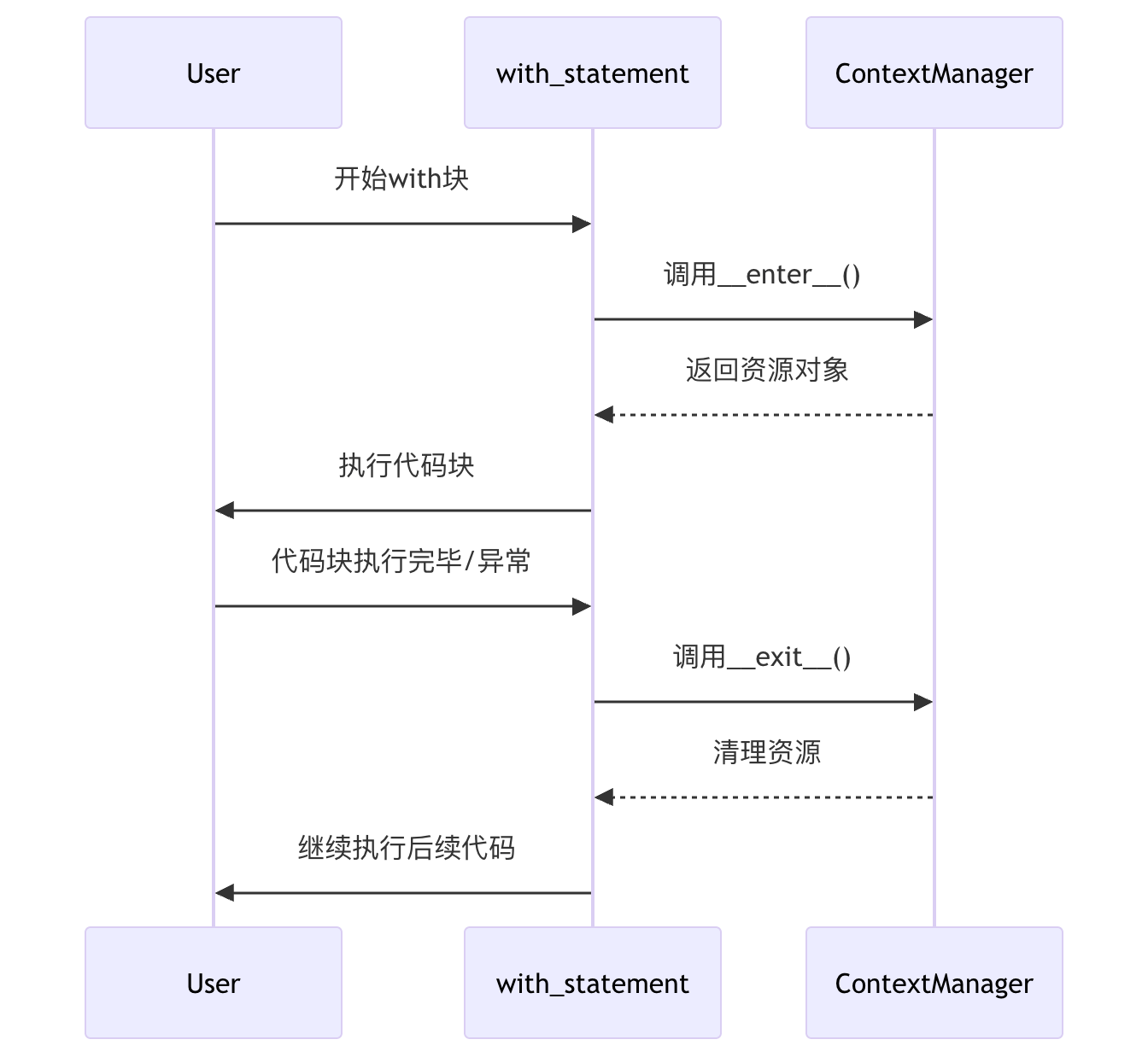
异常处理机制
__exit__() 方法接收三个参数:
exc_type:异常类型exc_val:异常值exc_tb:异常追踪信息
如果 __exit__() 返回 True ,则表示异常已被处理,不会继续传播;返回 False 或 None ,异常会继续向外传播。
实际应用场景
1. 文件操作
实例
# 同时打开多个文件with open('input.txt', 'r') as infile, open('output.txt', 'w') as outfile: content = infile.read() outfile.write(content.upper())2. 数据库连接
实例
import sqlite3
with sqlite3.connect('database.db') as conn: cursor = conn.cursor() cursor.execute('SELECT * FROM users') results = cursor.fetchall()# 连接自动关闭3. 线程锁
实例
import threading
lock = threading.Lock()
with lock: # 临界区代码 print("这段代码是线程安全的")4. 临时修改系统状态
实例
import decimal
with decimal.localcontext() as ctx: ctx.prec = 42 # 临时设置高精度 # 执行高精度计算 # 精度恢复原设置创建自定义的上下文管理器
类实现方式
我们可以通过实现 __enter__ 和 __exit__ 方法创建自定义的上下文管理器:
实例
class Timer: def __enter__(self): import time self.start = time.time() return self
def __exit__(self, exc_type, exc_val, exc_tb): import time self.end = time.time() print(f"耗时: {self.end - self.start:.2f}秒") return False
# 使用示例with Timer() as t: # 执行一些耗时操作 sum(range(1000000))使用 contextlib 模块
Python 的 contextlib 模块提供了更简单的方式来创建上下文管理器:
实例
from contextlib import contextmanager
@contextmanagerdef tag(name): print(f"<{name}>") yield print(f"</{name}>")
# 使用示例with tag("h1"): print("这是一个标题")输出:
<h1>这是一个标题</h1>常见问题与最佳实践
常见错误
1、错误地认为 with 只能用于文件 :
实例
# 错误:认为只有文件需要withconn = sqlite3.connect('db.sqlite')# 应该使用with语句2、忽略__exit__的返回值 :
实例
class MyContext: def __exit__(self, exc_type, exc_val, exc_tb): # 忘记返回True/False可能导致异常处理不符合预期 pass最佳实践
- 优先使用 with 管理资源 :对于文件、网络连接、锁等资源,总是优先考虑使用
with语句 - 保持上下文简洁 :
with块中的代码应该只包含与资源相关的操作 - 合理处理异常 :在自定义上下文管理器中,根据需求决定是否抑制异常
- 利用多个上下文 :Python 允许在单个
with语句中管理多个资源
总结要点
| 关键点 | 说明 |
|---|---|
| 自动资源管理 | with 语句确保资源被正确释放 |
| 上下文协议 | 需要实现 __enter__ 和 __exit__ 方法 |
| 异常安全 | 即使代码块中出现异常,资源也会被释放 |
| 常见应用 | 文件操作、数据库连接、线程锁等 |
| 自定义实现 | 可以通过类或 contextlib 创建自定义上下文管理器 |
with 语句是 Python 中一项强大的特性,它不仅能简化代码,还能提高程序的健壮性。掌握 with 语句的使用和原理,将帮助你写出更专业、更可靠的 Python 代码。
练习题
-
1. with 语句基本用法 创建文件
test_with.py,完成以下操作:- 用
with语句读取文件内容 - 用
with语句写入文件
知识点: with open(文件, 模式) as 变量:
参考答案:
# 写入文件with open('test.txt', 'w') as f:f.write("Hello, Python!")# 读取文件with open('test.txt', 'r') as f:content = f.read()print(content) - 用
-
2. 同时操作多个文件 创建文件
test_multi.py,完成以下操作:- 用
with同时打开两个文件 - 从一个文件读取内容,写入另一个文件
知识点: with open(文件1) as f1, open(文件2) as f2:
参考答案:
# 先创建源文件with open('source.txt', 'w') as f:f.write("这是源文件内容")# 同时读取和写入with open('source.txt', 'r') as infile, open('dest.txt', 'w') as outfile:content = infile.read()outfile.write(content.upper())print("复制完成") - 用
-
3. 自定义上下文管理器 创建文件
test_custom.py,完成以下操作:- 用类实现一个计时器上下文管理器
- 记录代码执行时间
知识点: class 类名: def enter: def exit:
参考答案:
class Timer:def __enter__(self):import timeself.start = time.time()return selfdef __exit__(self, exc_type, exc_val, exc_tb):import timeself.end = time.time()print(f"耗时: {self.end - self.start:.2f}秒")return False# 使用示例with Timer():total = sum(range(1000000))print(f"计算结果: {total}") -
4. contextlib 模块 创建文件
test_contextlib.py,完成以下操作:- 用
@contextmanager装饰器创建上下文管理器 - 实现一个简单的标签生成器
知识点: from contextlib import contextmanager、@contextmanager
参考答案:
from contextlib import contextmanager@contextmanagerdef tag(name):print(f"<{name}>")yieldprint(f"</{name}>")# 使用示例with tag("h1"):print("这是一个标题")with tag("p"):print("这是一个段落") - 用
评论区
如果你喜欢,那么欢迎来到我的世界!
了解更多音乐
暂未播放